Start with the daily handout. Work through a guided problem. Then let students practise at increasing levels of difficulty, with their progress in one place.
Open the day’s Guided problem. Connect the simulation to the diagram and equations, one step at a time. Hints and worked values help students continue when arithmetic gets in the way.
Move from a first application to more demanding problems. Set a daily point target and decide which difficulty levels suit your students.
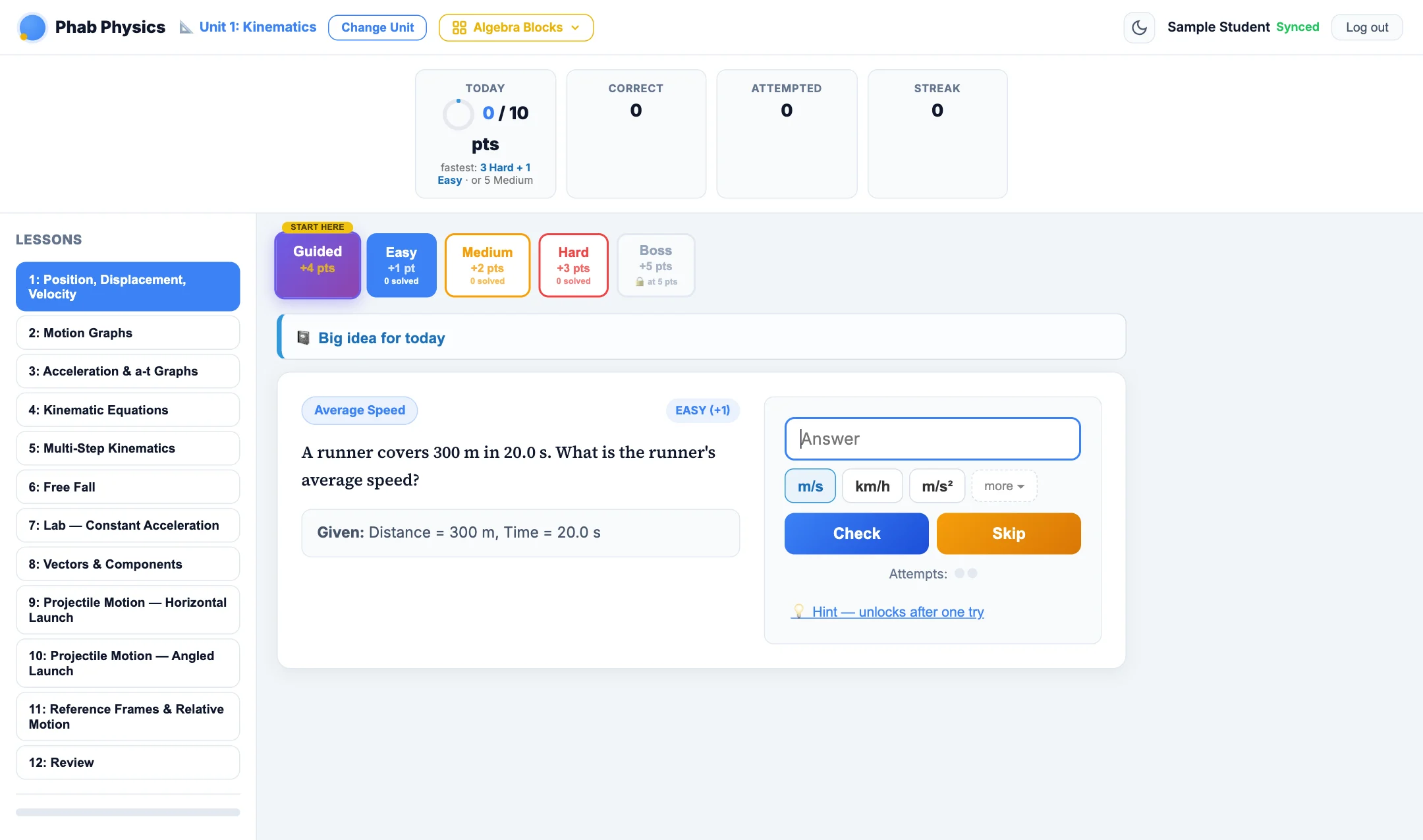
Easy +1Medium +2Hard +3Boss +5
This is a teaching sequence, not a requirement to finish every difficulty. Guided completion is worth 4 points; Boss unlocks at 5 points for that day when enabled. Labs, reviews and tests may use a different routine, and not every day has a guided problem.
Before students arrive
Set up a class, then share its code.
These steps are for teachers with an active account. Before sharing a class code, confirm your district’s approval and complete any required agreement with us. School-use review status.
Sign in to the teacher dashboard
Open the dashboard and choose Sign in with Google. Use the Google account that has teacher access.
Create a class and choose its course
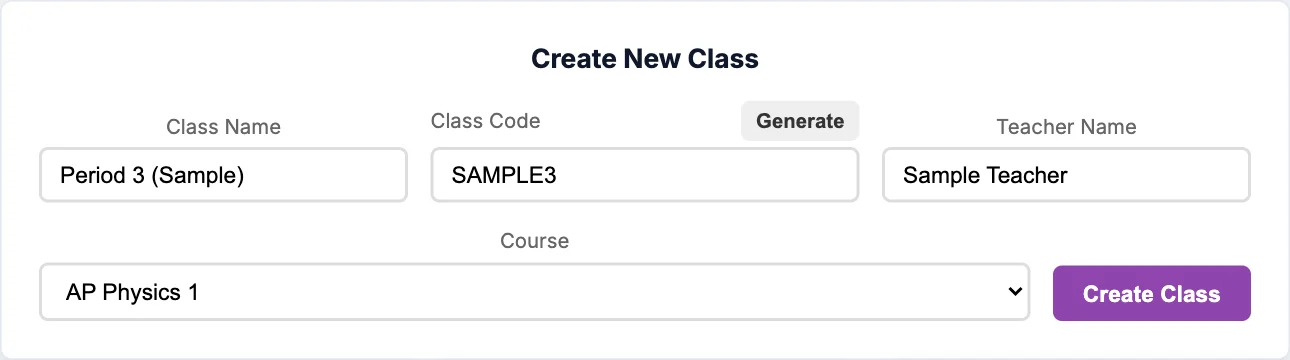
Select + New Class. Enter the class name, join code and teacher name, then choose AP Physics 1, AP Physics 2 or AP Physics C. Create a separate class for each section you want to track.
Share the join code with your students
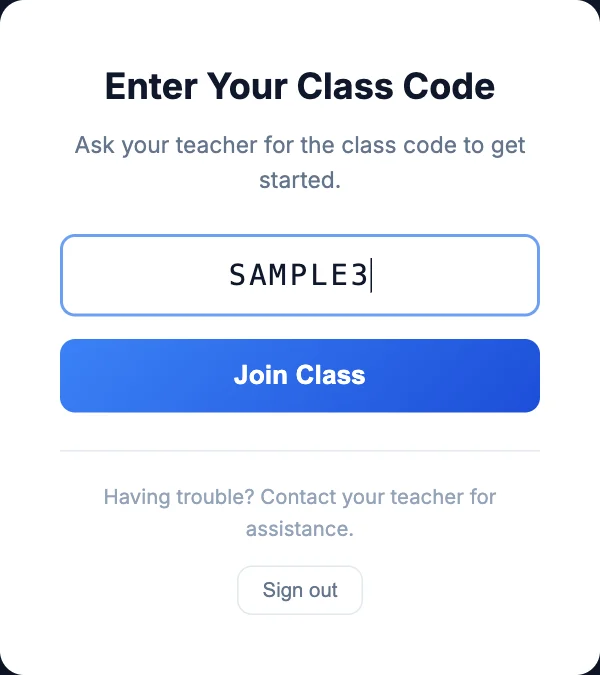
Students visit phabphysics.com, sign in with Google and enter your class code. Once they join, the class’s course loads automatically.
Choose the daily goal
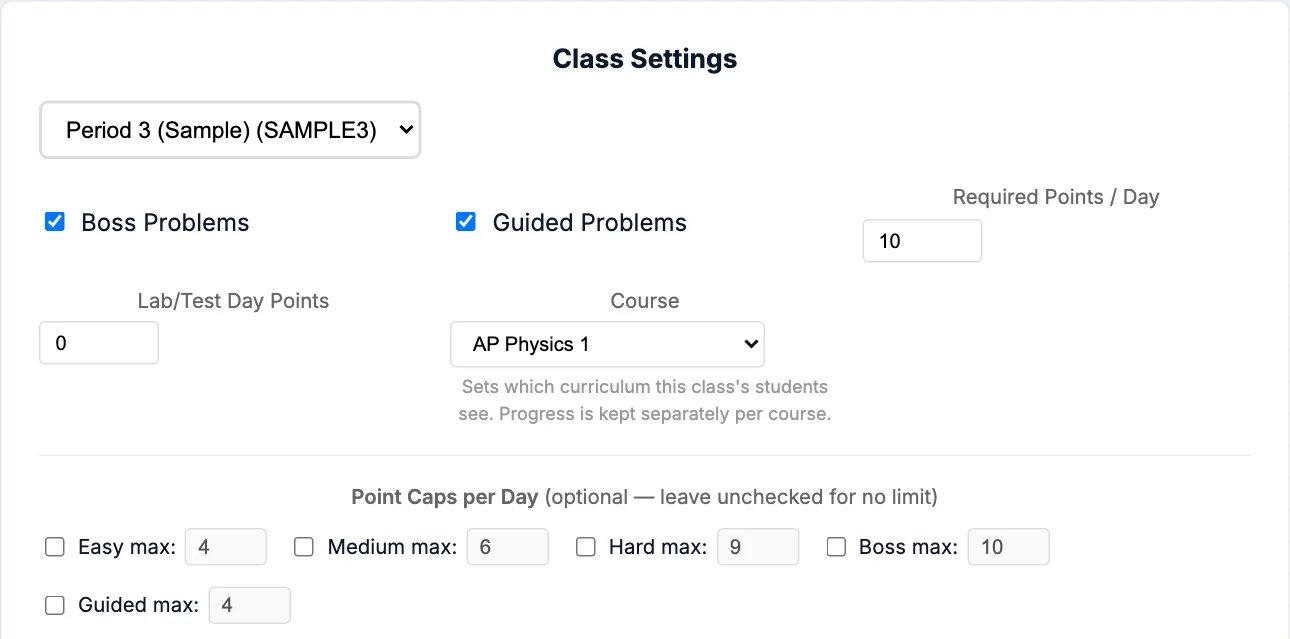
Under Class Settings & Archive, select your class. Set the required points, enable Guided and Boss as appropriate, and review the per-difficulty point caps. Settings save automatically.
Tell students the unit, day and target
For example: “Unit 1, Day 1: complete the handout, work through Guided, then practise to our daily point target.” The site records online practice; collect or discuss the paper work separately.
Enlarge ↗Create the class. The course controls which lessons students see. Sample form; use your own class code.Enlarge ↗Set expectations. Ten points is the default daily goal, not a required choice. These are sample settings.
Prefer a shorter checklist? Use the step-by-step setup guide. Answer keys and unit Teacher Guides are available to approved teachers on the Handouts page.
During and after practice
See who is ready to move on.
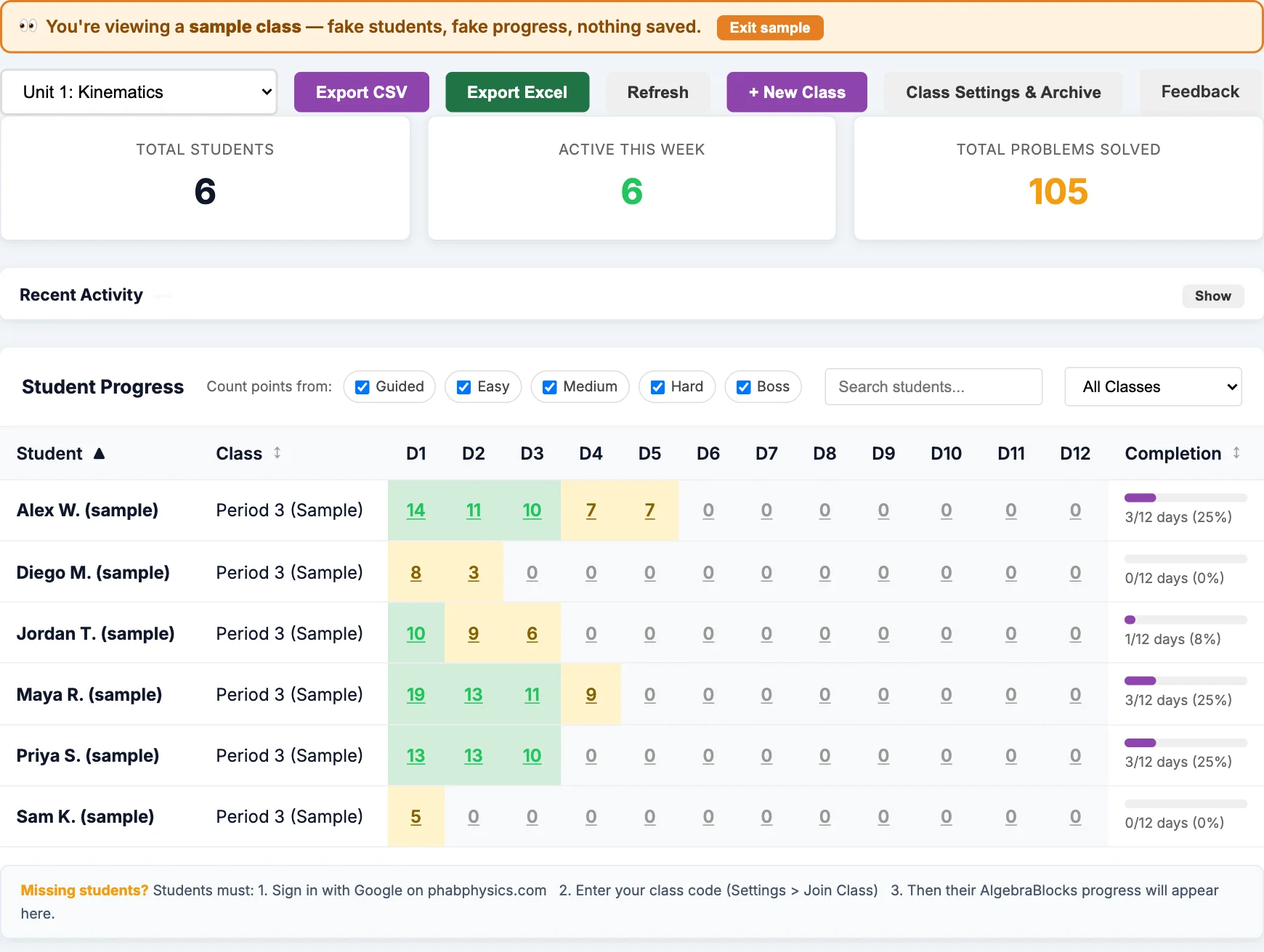
Filter by class and unit. Look across the day columns, then open an individual score when you need more detail.
Enlarge ↗Actual dashboard with the built-in sample class. All names and progress here are fictional.
Check the day
Use the class and unit filters to focus on the group you are teaching. Select Refresh to load the latest saved progress.
Look beyond the total
Click a day score for its difficulty breakdown. Use that alongside students’ written reasoning and your classroom conversations.
Take grades with you
Export CSV or Export Excel when you need a copy for your gradebook. Paper handouts are not automatically graded by the site.
What students do
Join once. Open the assigned day.
Students use their own Google accounts. The class code connects them to your class and its course.
Sign in and join
Visit phabphysics.com, choose Google sign-in and enter the code your teacher shares. Use a regular signed-in account for class work, not guest practice.
Choose the unit and day
Open the assigned unit, then select the day in Lessons. Match it to the daily handout.
Work through Guided first
Use the simulation, pause or replay when needed, and work through the questions. Open the hints and worked help if a calculation blocks your progress.
Practise to the class target
Return to the same day and use Easy, Medium, Hard and Boss as your teacher directs. Check Today for the day’s points and Synced before leaving.
Enlarge ↗One-time class setup. The code shown is an example, not a public join code.
Enlarge ↗Actual student interface with sample data. Guided sits beside independent practice; Boss shows its unlock threshold.
A short routine to share with your class
Open the assigned course, unit and day. Complete the daily handout, then work through the Guided problem if one is assigned. Use hints and worked help when you need them. Return to the same day for Easy, Medium, Hard and Boss practice as directed, and work toward our daily point target. Check that your progress says Synced before you leave.
Inside the guided problems
Watch the physics. Work through the reasoning.
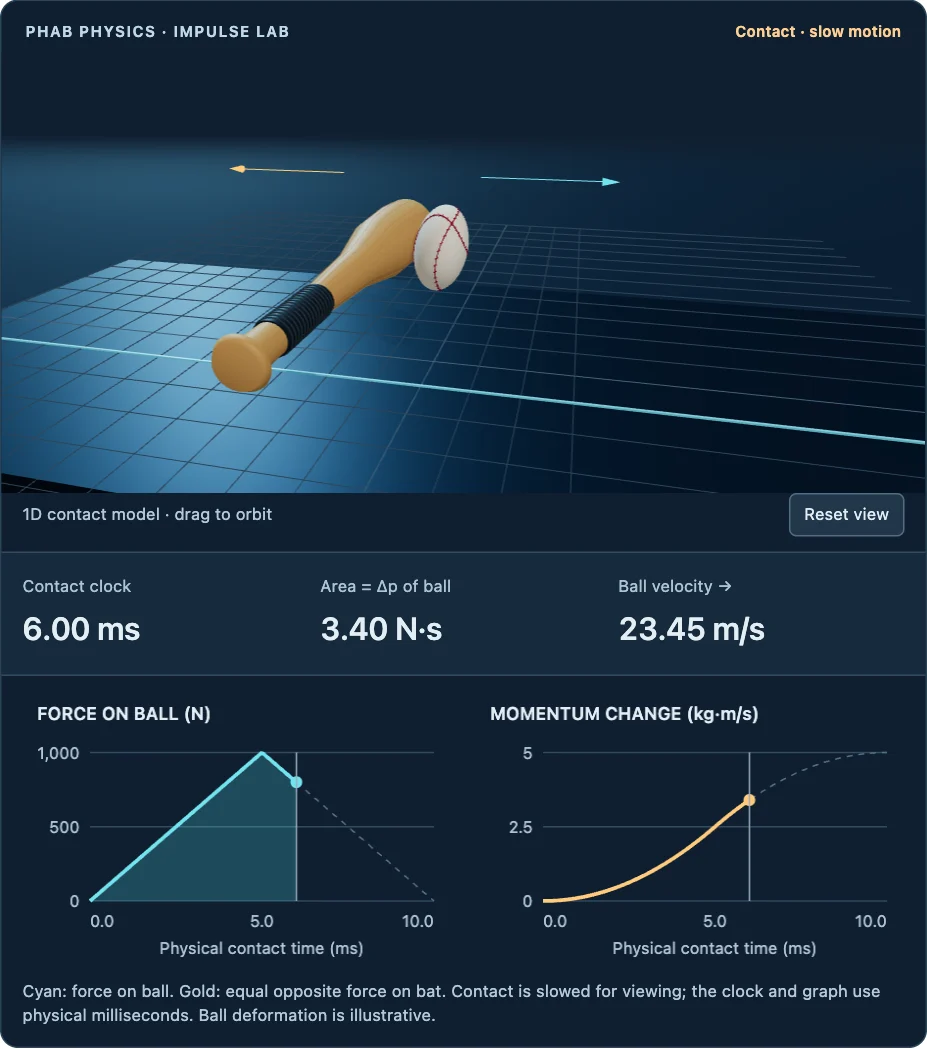
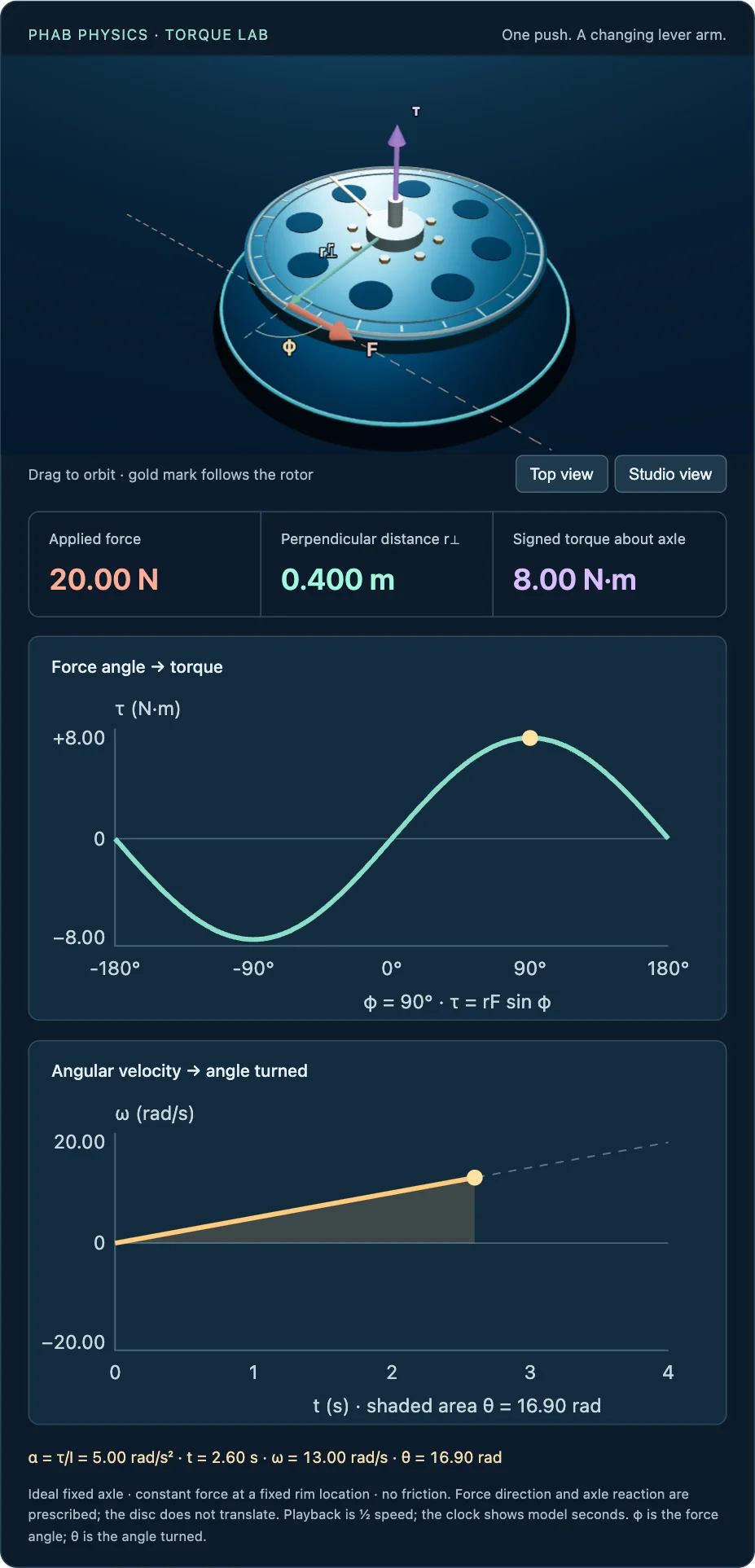
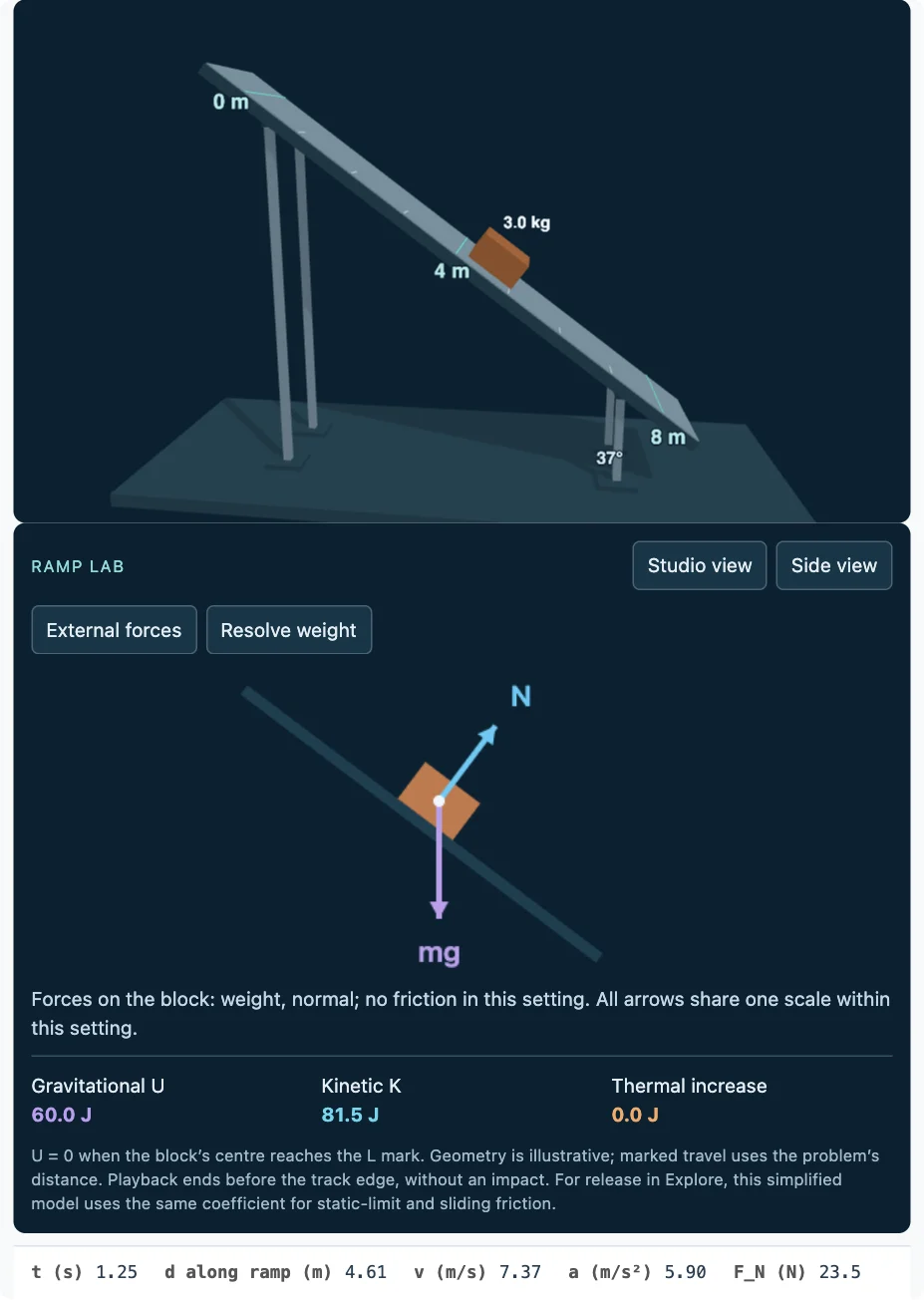
Open an example to try its controls and questions. For class credit, students should launch Guided from their assigned day in practice.
The scenes are teaching models. Their on-screen notes state the idealizations, time scaling and limits of the displayed geometry.
At the end of a unit
Then students take on the Unit Mission.
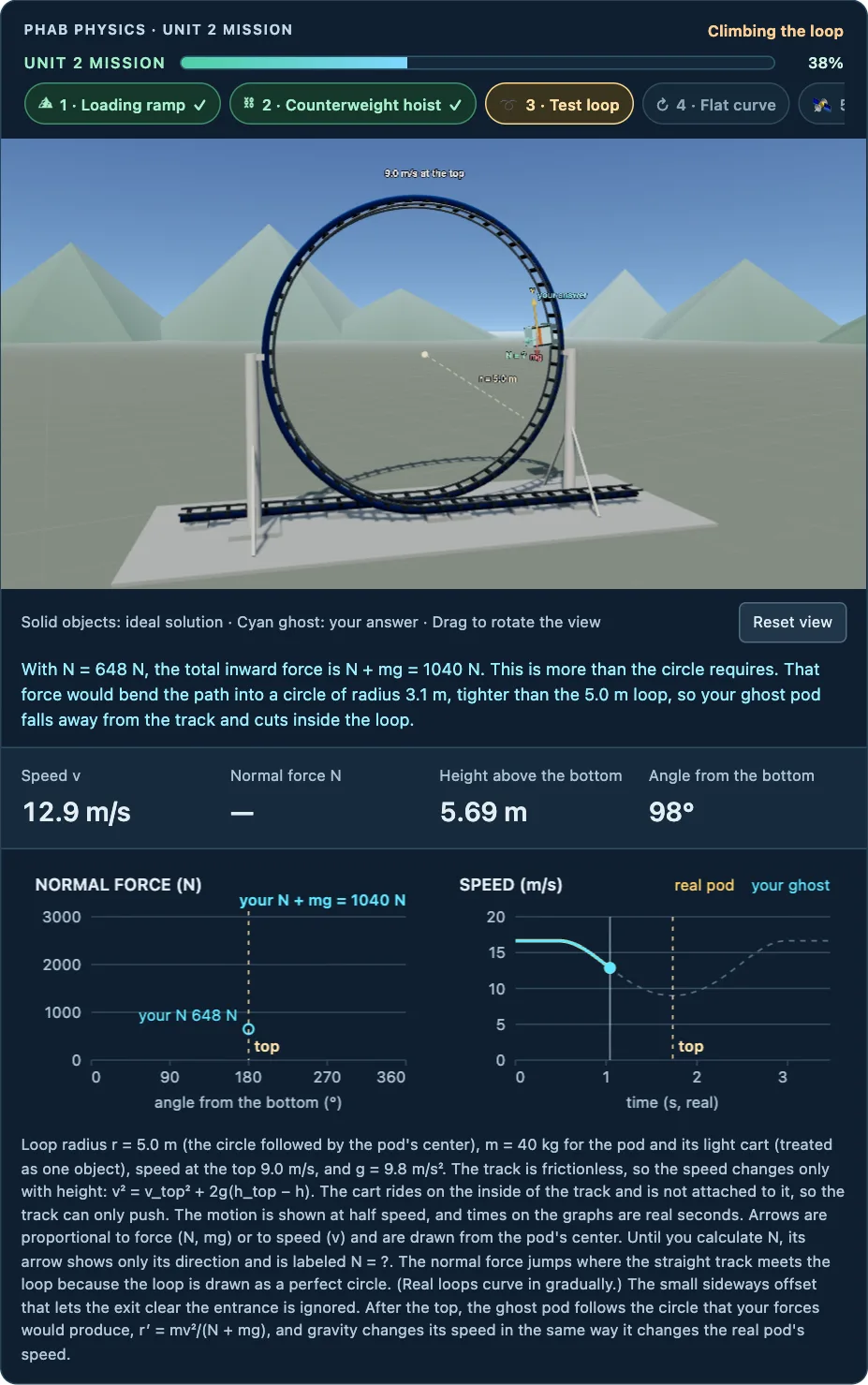
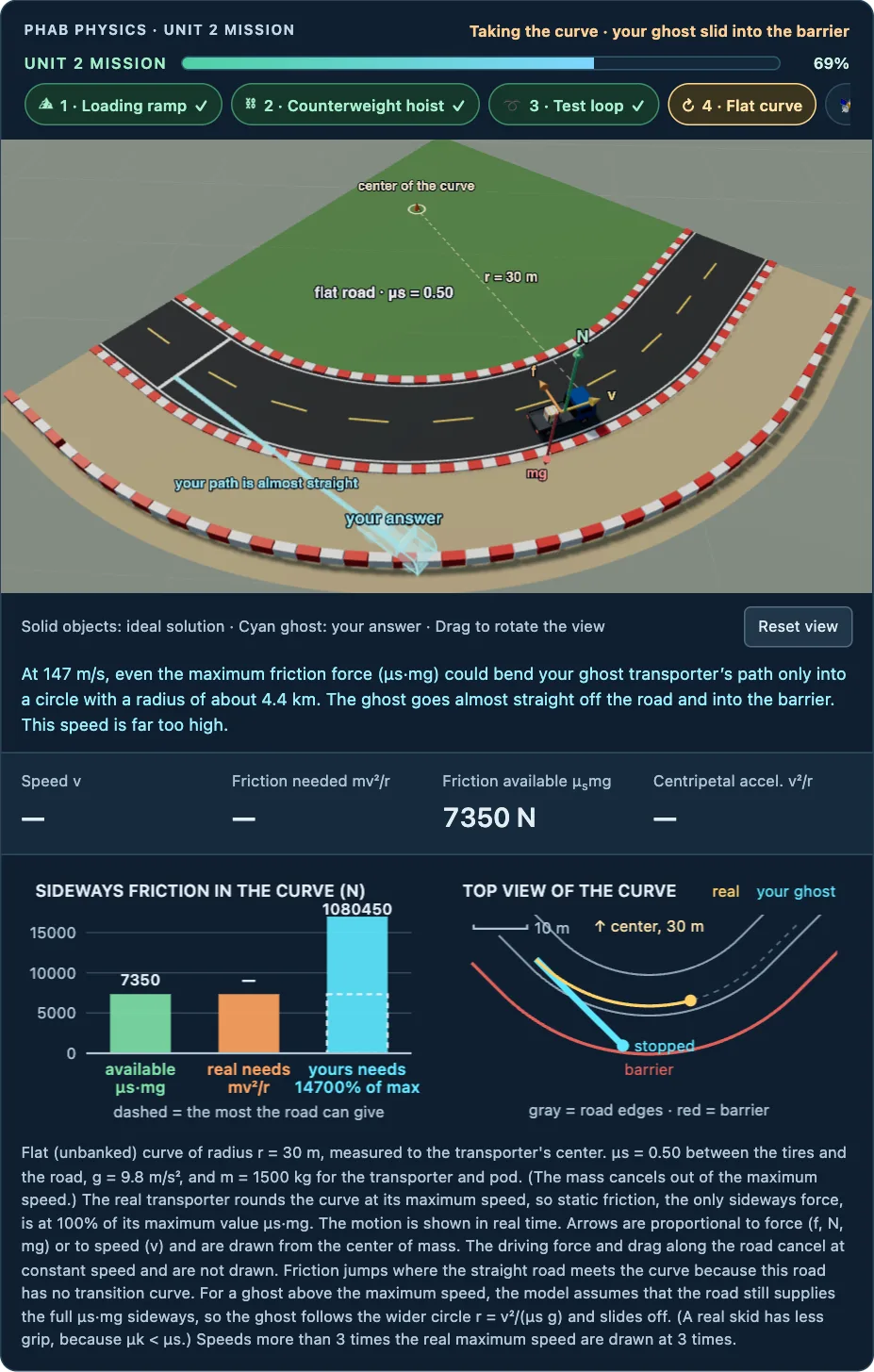
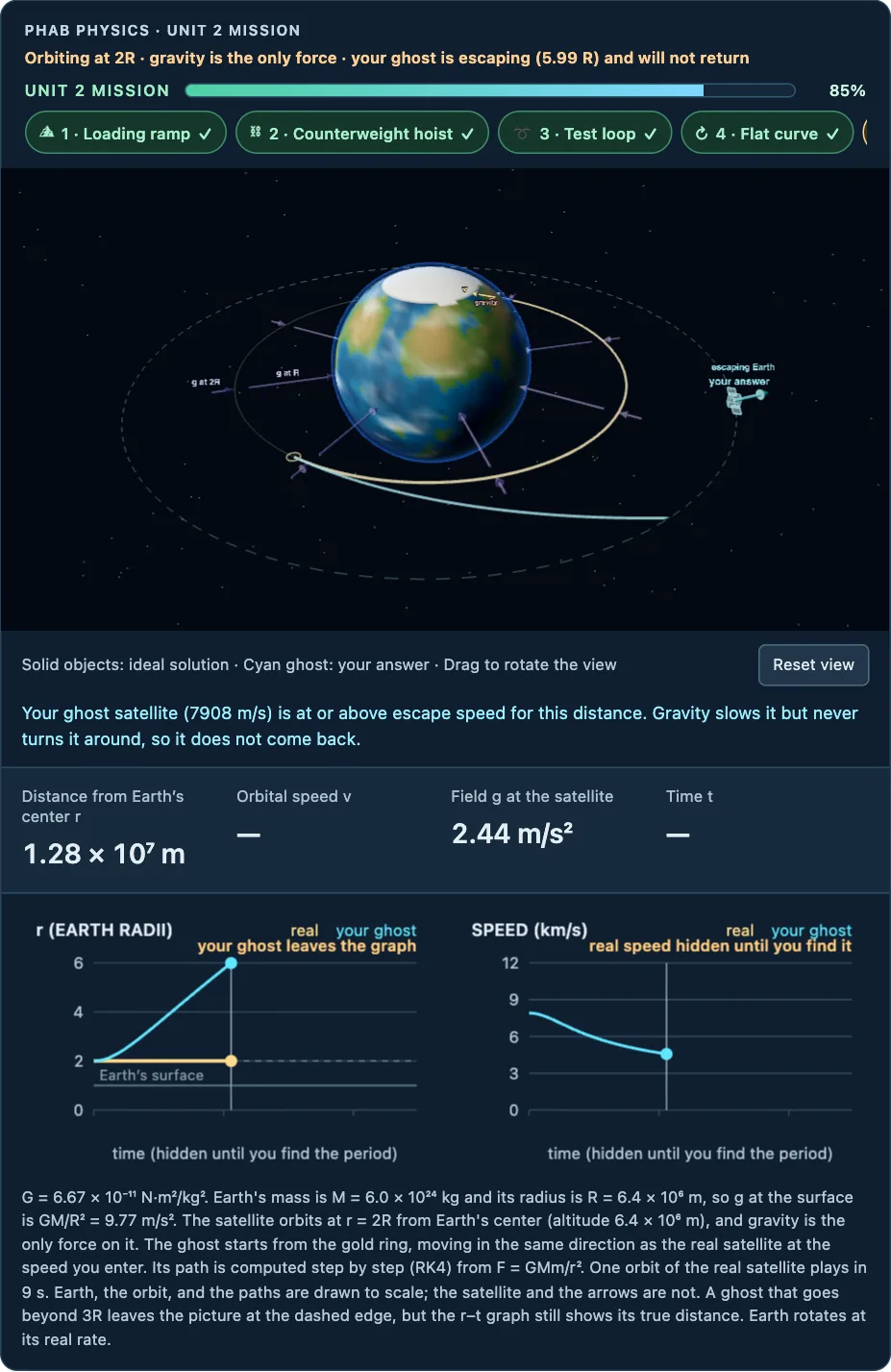
One multi-stage problem covers most of the unit’s skills. Students draw free-body diagrams and energy bar charts, calculate values, and answer multiple-choice questions. Each stage runs only after students answer its question. A cyan ghost then moves according to the student’s answer, next to the ideal solution, so students can compare their prediction with the correct motion. Each common mistake also receives its own written explanation. The Unit Mission is available now for Units 2 and 3 in AP Physics 1 and AP Physics C: Mechanics.
A 53-second look at a student working through the AP Physics 1 Unit 2 Mission, recorded from the site itself. The video has no sound.
Students find the maximum speed that friction allows. If their answer is too high, the ghost slides off the road. If it is too low, the friction bars show that the road could supply more force.
Students calculate the orbital speed at 2R. If they use Earth’s radius by mistake, the ghost escapes. If they use the correct radius, the ghost follows the real satellite around the circle.
Each Mission is the last entry in its unit, labeled “Unit Mission.” Progress is saved in each student’s browser, so students can finish a Mission over two class periods. The completion card lists the topics a student missed on the first try. Try the Unit 2 Mission for AP Physics 1 or AP Physics C, or the Unit 3 Mission for AP Physics 1 or AP Physics C.
Equipment at a glance
Use this overview to check supplies before planning a unit. The per-unit Teacher Guides on the Handouts page include preparation, safety and facilitation notes, with alternatives where documented.
AP Physics 1
Unit 3: Energy: Extension springs, slotted mass sets with hangers, ring stands, meter sticks, spring projectile launchers with digital force meters, balls, balances, safety glasses, photogates or metersticks, a magnet-drop set (neodymium magnet, plastic and copper tubes), and computers for the PhET lab; a light suitcase optional.
Unit 8: Fluids: Two-liter bottles or tall buckets, rulers and meter sticks, tape, collection trays, a water source, paper towels, graph paper, paper strips, and straws with cups of water.
Unit 2: Forces & Circular Motion: Low-friction carts with tracks, pulleys, string, hanging mass sets, balances, motion sensors or phones, battery-powered flying-pig toys with overhead mounts, meter sticks, stopwatches, a turntable, and a ball on a string; vacuum-tube feather-drop apparatus optional.
Unit 1: Kinematics: Ramps, carts, metersticks, masking tape, phones (stopwatch + camera), balls, and graph paper; photogates optional.
Unit 4: Momentum: Dynamics carts and tracks, magnetic or Velcro bumpers, velocity sensors or video, and an optional teacher-approved small-object force-sensor setup with contained padding. Printed records support analysis when equipment is unavailable; ballistic pendulum optional.
Unit 5: Rotation I — Torque & Statics: Meter sticks, knife-edge fulcrums, hanging mass sets, mass hangers, string loops, a digital scale, a wrench-and-bolt rig, and a front-of-room boom-crane apparatus with an in-line spring scale; turntable and demo gears optional.
Unit 6: Rotation II — Energy & Angular Momentum: Ramps with a rolling-shape set (solid sphere, solid cylinder, hollow sphere, hoop), a hoop-and-disk pair, meter sticks, stopwatches, protractors, a rotating stool with two hand masses, a bike wheel with axle handles, a box and a cylinder; two look-alike race cylinders for the surprise finale.
Unit 7: Simple Harmonic Motion: Springs, slotted mass sets to 350 g, stopwatches or photogate timers, meter sticks, ring stands with clamps, adjustable pendulum strings with bobs, and protractors.
AP Physics 2
AP Physics 2 — Unit 13: Geometric Optics: Plane mirrors, pins, cork boards, rulers, and protractors; ray boxes or low-power lasers with semicircular acrylic blocks; clear mystery liquids and hollow cells; optical benches or metersticks, converging lenses, holders, illuminated objects, and screens.
AP Physics 2 — Unit 14: Waves, Sound & Physical Optics: Ropes, springs, string, ribbon, pulleys, masses, balances, and length tools; string vibrators or phone-speaker drivers; tuning forks and resonance tubes; low-power lasers, slits or gratings, matte screens, polarizers, light sensors, and soap-film supplies.
AP Physics 2 — Unit 15: Modern Physics: Browser devices for the supervised photoelectric investigation; optional low-power red/violet light cues and a burner or recorded heating sequence; spectrum tubes with a teacher-operated high-voltage supply, diffraction gratings, and a fixed calibration scale; two-sided coins or tokens and cups for the half-life investigation.
AP Physics 2 — Unit 9: Thermodynamics: Hotplate and crushed-can supplies; syringes and pressure sensors; insulated cups and thermometers; matched conduction rods; metal samples, hot-water baths, and balances; computers for the gas-piston investigation.
AP Physics C: E&M
AP Physics C: E&M — Unit 10: Capacitors: Large capacitor (1 F supercap or big electrolytic), battery or DC supply, small incandescent bulb, clip leads, and a balloon.
AP Physics C: E&M — Unit 11: Circuits: Battery, flashlight bulbs, clip leads, and computers for the PhET circuit lab.
AP Physics C: E&M — Unit 12: Magnetic Fields: Stiff wire or foil strip, strong horseshoe or neodymium magnet, variable low-voltage DC supply, switch, clip leads, and several compasses.
AP Physics C: E&M — Unit 13: Electromagnetic Induction: Neodymium bar magnet, coil with galvanometer, copper or aluminum tube; optional inductor coil and hand-crank generator.
AP Physics C: E&M — Unit 8: Electric Charges, Fields & Gauss's Law: Balloon and wool cloth, PVC or acrylic rod with fur, an optional hoop for the flux warm-up, and computers for the PhET field-mapping lab; electroscope and metal box optional for the Faraday-cage experiment.
AP Physics C: E&M — Unit 9: Electric Potential: Every warm-up can be completed on paper. Optional: two balloons and thread for Day 1; computer and projector for equipotential maps.
AP Physics C: Mechanics
AP Physics C: Mechanics — Unit 1: Kinematics: Ramp, cart, meterstick, masking tape, and a phone (stopwatch + camera) per group for the Day 9 constant-acceleration lab, plus a projector for the Day 10 crosswind-landing video — no other equipment is staged in this unit.
AP Physics C: Mechanics — Unit 2: Force & Translational Dynamics: Low-friction carts and tracks with end pulleys, string, hanging washer sets, motion sensors (or phones) and a balance for the Newton’s-second-law lab; a battery-powered flying-pig toy on string with an overhead mount, meterstick, and stopwatch for the conical-pendulum lab.
AP Physics C: Mechanics — Unit 3: Work, Energy & Power: Springs with slotted mass sets, meter sticks and stands (or spring-plunger launchers with force meters, balls, collection boxes, and safety glasses for the alternative lab track), a light suitcase for an optional demonstration, a magnet with matched plastic and copper tubes, and one browser device per pair for the PhET lab.
AP Physics C: Mechanics — Unit 4: Linear Momentum: Dynamics carts and tracks, magnetic or Velcro bumpers, velocity sensors or video, and an optional teacher-approved small-object force-sensor setup with contained padding. Printed records support analysis when equipment is unavailable; ballistic pendulum optional.
AP Physics C: Mechanics — Unit 5: Torque & Rotational Dynamics: Turntable and record with two markers, demo gears or an upturned bicycle, long and short wrenches with a bolt in a vise, a meter-stick balancing rig with hooked masses, equal-mass/equal-radius hoop and disk (plus sphere and cylinder) with a ramp, a hammer per pair, and a front-of-room boom-crane rig with an in-line spring scale.
AP Physics C: Mechanics — Unit 6: Energy & Momentum of Rotating Systems: A bike wheel with a grippable axle and a string, a box and a cylinder for the tip-vs-slide warm-up, and an optional ramp with equal-radius sphere, cylinder, and hoop for the ramp race.
AP Physics C: Mechanics — Unit 7: Oscillations: Springs with hooked or slotted masses from 50 to 350 g, stopwatches or photogates, meter sticks, ring stands and clamps, an adjustable-length string with two bobs and a protractor for the pendulum lab, and a computer with Algodoo plus a projector.
Create a teacher account
The practice materials and guided simulations are free to use.
2026–2027 is a pilot year. To set up a teacher account with class management and student progress tracking, you’ll need a teacher code from Alex.
Before enrolling students: school privacy and accessibility review is ongoing. Confirm your district’s approval and contact Alex to complete any required agreement. A teacher code or payment is not district approval or a signed data-privacy agreement. Read the current school-use status and accessibility review.
Don’t have a code? A new teacher account requires a payment of at least $5 on Ko-fi. You choose the amount; we suggest $3 per student. Ask for a teacher code in your Ko-fi message. If your school pays by invoice or purchase order, email Alex instead. Alex sends codes personally, so a payment does not activate an account immediately.
Have your teacher code? Enter it below, then continue with the Google account you want to use for teaching.
A new teacher account requires a one-time payment of at least $5 through Ko-fi. You choose the amount; we suggest $3 per student. Students never pay, and teachers who created accounts before October 14, 2026 do not need to pay. The payment is not a charitable donation; the Terms of Use explain what it covers.
Codes are sent personally, not automatically after a payment. If your school pays by invoice or purchase order, email Alex at alex@phabphysics.com instead. Pilot access does not promise ongoing access beyond the 2026–2027 school year.
Public student handouts remain available under the stated CC BY-NC-SA 4.0 license. Hosted accounts and classroom tracking are separate from permission to use those materials.